DKK Surveyors Pin Flag v1.0.0.0 LS25
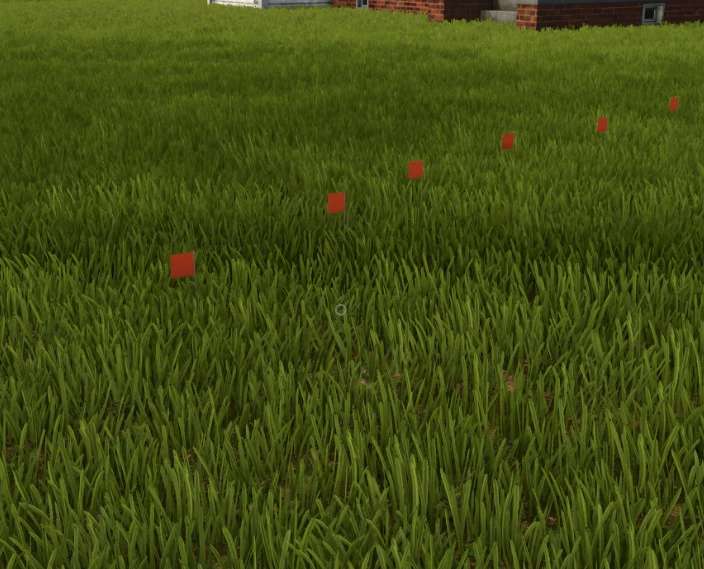
DKK Surveyors Pin Flag v1.0.0.0 LS25
Surveyor Pin Marking Flags | FS25
Mark Your Land. Plan Your Work. Protect Your Markers.
Bring a new level of realism and precision to Farming Simulator 25 with Surveyor Pin Marking Flags!
Whether you’re laying out a new field, planning a road, marking property boundaries, or preparing for your next construction project, these surveyor flags provide a simple and practical way to mark important locations across your farm.
Inspired by real-world surveying and construction practices, these flags can be used to identify reference points, utility routes, property corners, equipment paths, excavation areas, and future building locations.
Features
Free Placement: Place surveyor flags wherever you need a visual reference on your property.
Construction Menu Integration: Easily locate the flags under Construction Menu → Tools.
No Ground Deformation: Placing flags will not alter, flatten, or deform the surrounding terrain.
No Foliage Removal: Grass, crops, and other foliage remain undisturbed when placing your markers.
Destructible Flags: These are temporary field markers, not indestructible objects. Hitting or running over a flag will destroy it.
Replacement Required: Once a flag has been destroyed, you’ll need to place a new one in the ground.
Perfect For
Marking field corners and boundaries
Planning new roads, driveways, and access routes
Laying out future buildings and farm expansions
Identifying drainage ditches and utility routes
Marking excavation and landscaping areas
Establishing reference points for construction projects
Mapping equipment routes and working areas
Adding realistic surveying details to your farm
Important: Watch Where You’re Driving!
Just like real surveyor flags, these markers aren’t designed to withstand heavy equipment!
If you strike a flag with a vehicle, implement, or other equipment, it will be destroyed.
Destroyed flags do not automatically return to their original locations. You must manually purchase and place a replacement.
Plan your routes carefully, keep an eye on your markers, and make sure your hired hands don’t turn your carefully surveyed property into a flag graveyard!
Installation
Download the mod ZIP file.
Place the ZIP file into your Farming Simulator 25 mods folder.
Enable the mod when loading your savegame.
Open the Construction Menu and navigate to Tools.
Select your surveyor flags and place them wherever needed.
Final Notes
These flags are intended as physical, visual reference markers for farming, surveying, construction, and roleplay activities. They do not automatically measure distances, establish property ownership, or modify the terrain.
Small flags. Big plans. Mark it before you move it!