Moisture System V1.0.0.0 LS25
Moisture System V1.0.0.0 LS25
A comprehensive moisture simulation mod for Farming Simulator 25
This gives your operation realistic moisture monitoring.
Overview:
The Moisture System mod introduces dynamic moisture levels that affect crops, grass and bales across your farm.
Humidity varies depending on terrain elevation, weather conditions and time of day.
This creates a more realistic gaming experience where harvesting at the right time and careful inventory management are crucial.
Key Features
Dynamic field humidity
The moisture level in your fields depends on several factors:
Altitude: Lower elevations retain more moisture, while higher elevations are drier.
Weather Conditions: Rain and snow increase humidity while dry periods decrease it.
Temperature: Warmer temperatures accelerate moisture loss.
Time of day: Humidity decreases more during the day than at night.
Monthly Variations: Moisture levels change throughout the year depending on the type of environment chosen (dry/normal/humid).
Plant Quality Assessment System:
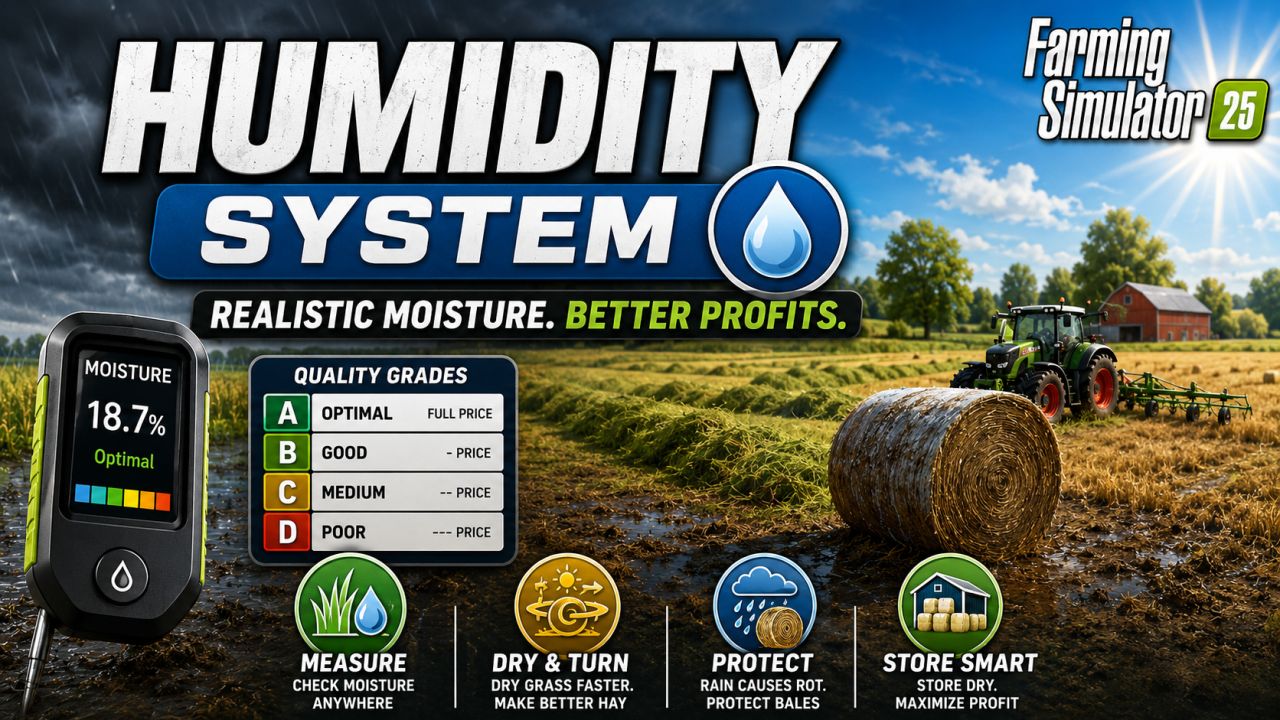
The harvested crop is divided into quality levels A to D based on its moisture content.
Level A: Optimum moisture content – full price
Level B: Good moisture content – slightly reduced price
Level C: Medium humidity – moderately reduced price
Level D: Poor moisture content – significantly reduced price
Each type of crop has its own ideal moisture content.
Harvest at the right time to maximize your profits! You can view the detailed quality ranges for all supported plant species in the game menu.
Crops such as root vegetables are not currently tested for moisture, as it is less relevant for these species.
If you think a particular plant species should be included in the system, please contact us.
Humidity monitoring throughout operation.
The mod monitors humidity in the following areas:
Standing plants: Fields retain moisture depending on the weather and terrain.
Crop: Combines and harvesters transfer moisture from the field to the crop.
Vehicles and Equipment: When transporting crops between different vehicles, the moisture content is maintained.
Earth piles: Harvest piles placed on the ground retain their specific moisture properties.
Silos and storage facilities: Prices for plants sold are based on their moisture content.
Turn and dry
Control your hay production with realistic grass drying mechanisms:
Turning: Use a hay tedder to spread and aerate the grass, reducing moisture content.
You can repeat this process several times! Weather influences on drying: Sunshine accelerates drying, and rain increases moisture.
Automatic hay conversion: Once the grass is sufficiently dry, it will automatically be converted into hay.
Rain Effect: Grass piles accumulate water when wet.
Progressive rot: After enough rain, the grass begins to rot and lose volume.
Soil decomposition:
Crop residues and feed left on the ground must be collected immediately.
Straw and Grass Piles: Both grass and straw piles left on the ground are exposed to the rainy season.
Shelter: The posts can tolerate some rain before decomposition begins.
Progressive decay: The longer the material is exposed to rain, the faster it will rot.
Desiccation: When the rain stops, the piles slowly dry out, but once the rot has started it cannot be stopped.
Loss of volume: Rotting material gradually decreases in volume and should therefore be collected or baled immediately.
Bale splitting system
Bales exposed to the elements require proper handling.
Rain Exposure: Bales accumulate moisture when wet and left uncovered. Weather conditions
Bales can be exposed to the elements for a period of time before rot sets in. This is the “wet” state.
Progressive rot: The longer the bales have been exposed to the weather, the faster they will rot.
Drying: The bales will dry slowly as soon as the rain stops. However, once rot has set in, they can no longer recover.
Protection: Wrapped and covered bales are protected from the elements.
Loss of volume: Rotting bales gradually lose volume.
Visual indicators:
Easily monitor humidity with built-in tools:Moisture Meter (Handheld): Equip the meter to read the accurate moisture content of the field or soil at your current location.
HUD Display: Optional display of field humidity in the game HUD.
Yield Menu: Access detailed tables with optimal moisture ranges for all crop types via the game menu (Shift+M).
Humidity Calendar: View monthly humidity ranges for your selected environment type.
Application
Getting started
Install the mod: Place the mod in your Farming Simulator 25 “Mods” folder.
Start the Farm: The humidity system runs automatically in all saved games.
Access Settings: Open the game Settings menu to configure the humidity parameters (the default settings are suitable for most players).
Using the moisture meter
The moisture meter is a handheld device that allows you to check the moisture content of the soil or field:
Purchase a moisture meter from the hand tools section of the store. Select the moisture meter.
Press and hold the action button for 4 seconds to read the current moisture level.
Alternatively, you can activate the “Show field moisture” option in the settings; This will display the moisture content in the field info HUD without having to use the hand tool. Plant quality control
Monitor field moisture: Check moisture levels with a moisture meter or HUD.
Determine when to harvest: Harvest when moisture is within the optimal range for your crop.
Check Quality Levels: Find the ideal humidity ranges in the Quality Levels menu (Shift+M).
Store correctly: Moisture affects the selling price. Plan your sales accordingly.
Drying grass for hay
Mow the grass as usual with a lawnmower. Rotate the windrows: Use a hay tedder to spread and aerate the grass.
Wait for it to dry: Grass dries out over time, especially in sunny weather. Turn several times: Turn the grass several times to speed up drying.
Baling or Harvesting: Once the grass is sufficiently dry, harvest it as hay for better storage.
Protect bales
How to prevent rot in bales:
Store under cover: Store the bales in barns or under a roof.
Wrap bales: Use a bale wrapper to protect the bales from the elements.
Monitor weather conditions: Check bales regularly if stored outdoors.
Remove in a timely manner: Harvest or sell the bales before they rot. Absolutely clear configuration
Environment types
Choose from three climate presets that affect moisture distribution throughout the year:
Dry: Lower overall moisture, drier growing conditions.
Normal: Balanced humidity (default).
Humid: Higher humidity, wetter growing conditions.
Customizable Settings:
Customize the mod’s behavior to suit your preferences.
Moisture Loss Multiplier: Control how quickly fields dry out.
Humidity Gain Multiplier: Control how quickly humidity increases when it rains.
Moisture Reduction When Turning: Adjust how much moisture is removed per turn.
Bale Rot: Enable or disable bale rot.
Bale Rot Rate: Adjust how quickly bales rot.
Bale Grace Time: Change how much rain bales can tolerate.
Bale Drying Rate: Adjust how quickly bales dry after rain.
Field humidity display: Toggle field humidity on/off in the HUD.
Moisture Meter Reports: Choose between flashing alerts or notifications.
Multiplayer:
The mod is fully compatible with multiplayer mode.
Server Settings: The host/administrator controls the humidity settings.
Synchronized: All players see the same humidity levels and classes.
Permissions: Set in the server administrator menu.
Game Menus: Access humidity information from the game menu.
Crop Classes: Displays moisture ranges and price multipliers for all crops.
Humidity Calendar: Displays monthly humidity ranges for your environment type.
Game Settings: Configure all mod settings.
Tips for success
Get to know your plants: Each type of plant has different optimal moisture ranges – check the quality menu. Pay attention to the weather: Plan the harvest with weather conditions in mind for optimal results.
Take Advantage of the Terrain: Remember that lower areas are wetter – take this into account in your crop and plant selection decisions.
Harvest in time: Do not leave piles of grass or straw lying unprotected in the rain – they will rot.
Protect or Process: Bale and bag or store the crop before the weather changes.
Turn several times: When the weather is nice, turn the grass several times to ensure it dries as quickly as possible.
Monitor Moisture: Check moisture levels in the field before you begin harvesting.
Acknowledgments:
A big thank you to all internal testers. Special thanks to Scroft and Mark Thor!